

15 Best AI Tools for Small Business Owners in 2026
A practical, no-hype guide to the 15 AI tools worth using in 2026, organized by what they actually do for your business: content, sales, support, automation and productivity, plus when off-the-shelf tools stop being enough.
Smarteer Team
Contents
AI doesn't have to mean replacing your team or rebuilding your business from scratch. For most small businesses, the real opportunity is much simpler: answering customers faster, creating content without hiring a designer, cutting down repetitive admin, keeping information organized, and automating the workflows that currently live in someone's head.
The hard part isn't finding an AI tool. There are thousands of them, and new ones launch every week. The hard part is figuring out which tools are actually worth paying for, what they can realistically automate, and at what point an off-the-shelf tool stops being enough for your business.
This guide covers the 15 AI tools worth knowing about in 2026, organized by what they actually do for your business, not just what they're called.
Key Takeaways
Swipe, or use the arrows on each card →
Quick Answer: The Best AI Tools for Small Businesses
| Need | Best tool | Best for |
|---|---|---|
| General AI assistant | ChatGPT | Everyday business tasks |
| Long-form analysis | Claude | Documents & reasoning |
| Research | Perplexity | Research & discovery |
| Design | Canva | Marketing creatives |
| Video | Descript / CapCut | Short-form video |
| CRM | HubSpot | Leads & customers |
| Automation | Zapier / Make | Connecting apps |
| Advanced automation | n8n | Complex workflows |
| Meetings | Fireflies / Otter | Meeting notes |
| Knowledge & tasks | Notion | Project management |
| Email marketing | HubSpot / Mailchimp | Marketing |
| Customer support | Intercom Fin | Support automation |
| Scheduling | Calendly | Appointments |
| Analytics | Google Analytics | Website insights |
| Custom automation | Smarteer | Business-specific workflows |
1. How AI Can Actually Help a Small Business
Before picking a single tool, it helps to know where AI actually moves the needle in a small business. In practice it comes down to five areas:
- Marketing. Content, social posts, ad copy, SEO research.
- Sales. Lead qualification, follow-ups, proposals.
- Customer support. FAQs, chat, email, WhatsApp, ticket handling.
- Operations. Data entry, reports, scheduling, documents.
- Business intelligence. Summaries, analysis, forecasting, dashboards.
The best AI tool isn't necessarily the most powerful one on the market. It's the one that removes a real bottleneck in your business. Keep that filter in mind as you read the rest of this list, because it's easy to get pulled toward whichever tool has the loudest marketing.
2. Best AI Tools for Content & Marketing
ChatGPT
What it does: General-purpose AI assistant for writing, brainstorming, research and quick analysis.
Best business use cases: Drafting social captions, first-pass blog outlines, customer email replies, product descriptions.
Pros: Fast, flexible, huge plugin/app ecosystem, strong at everyday tasks.
Limitations: Needs a human editor for anything customer-facing; can sound generic without a clear brief.
Who should use it: Almost every small business, as a starting point.
Pricing: Free tier available; Plus around $20/month per seat.
Claude
What it does: An AI assistant that's particularly strong at reading and reasoning over long documents.
Best business use cases: Summarizing contracts, analyzing reports, drafting longer strategy or policy documents.
Pros: Handles long context well, tends to be more careful and structured in its answers.
Limitations: Smaller plugin ecosystem than ChatGPT.
Who should use it: Businesses that deal with a lot of documents, proposals or research.
Pricing: Free tier available; Pro around $20/month per seat.
Perplexity
What it does: AI-powered research and search, with cited sources.
Best business use cases: Market research, competitor scans, fact-checking before you publish content.
Pros: Cites its sources, faster than manually searching and cross-checking multiple pages.
Limitations: Not a writing tool by itself, best paired with ChatGPT or Claude for the actual drafting.
Who should use it: Anyone doing regular research, content planning or competitive analysis.
Pricing: Free tier available; Pro around $20/month.
Canva
What it does: Design tool with built-in AI for image generation, background removal, resizing and brand kits.
Best business use cases: Social media graphics, presentations, simple ad creatives, one-page flyers.
Pros: No design skill required, huge template library, AI features are genuinely time-saving.
Limitations: Not a replacement for a real brand identity or complex layout work.
Who should use it: Any small business creating its own marketing visuals.
Pricing: Free tier available; Teams plans generally in the $10 to $30/month range depending on team size.
Descript / CapCut
What it does: AI-assisted video editing, including text-based editing, auto-captions and filler-word removal.
Best business use cases: Short-form video for Instagram Reels, YouTube Shorts, product demos, testimonial clips.
Pros: Edits video like editing a text document, dramatically faster than traditional timeline editing for short clips.
Limitations: Not built for long-form, heavily produced video work.
Who should use it: Any business doing regular short-form video content.
Pricing: Both have usable free tiers; paid plans typically start under $20/month.
3. Best AI Tools for Sales & CRM
A CRM without automation is just a spreadsheet with a nicer interface. The value shows up when the CRM starts doing work on its own, not just storing contact records.
HubSpot
What it does: CRM with AI-assisted lead scoring, email drafting, and reporting layered on top.
Best business use cases: Tracking leads through a pipeline, automated follow-up sequences, basic deal reporting.
Pros: The free tier is genuinely capable, not a crippled trial.
Limitations: Costs climb quickly once you need marketing automation or custom reporting at the Professional tier.
Who should use it: Any business with a sales pipeline worth tracking.
Pricing: Free CRM for unlimited users; paid seats generally start around $20/month, with Professional tiers running into the hundreds per month.
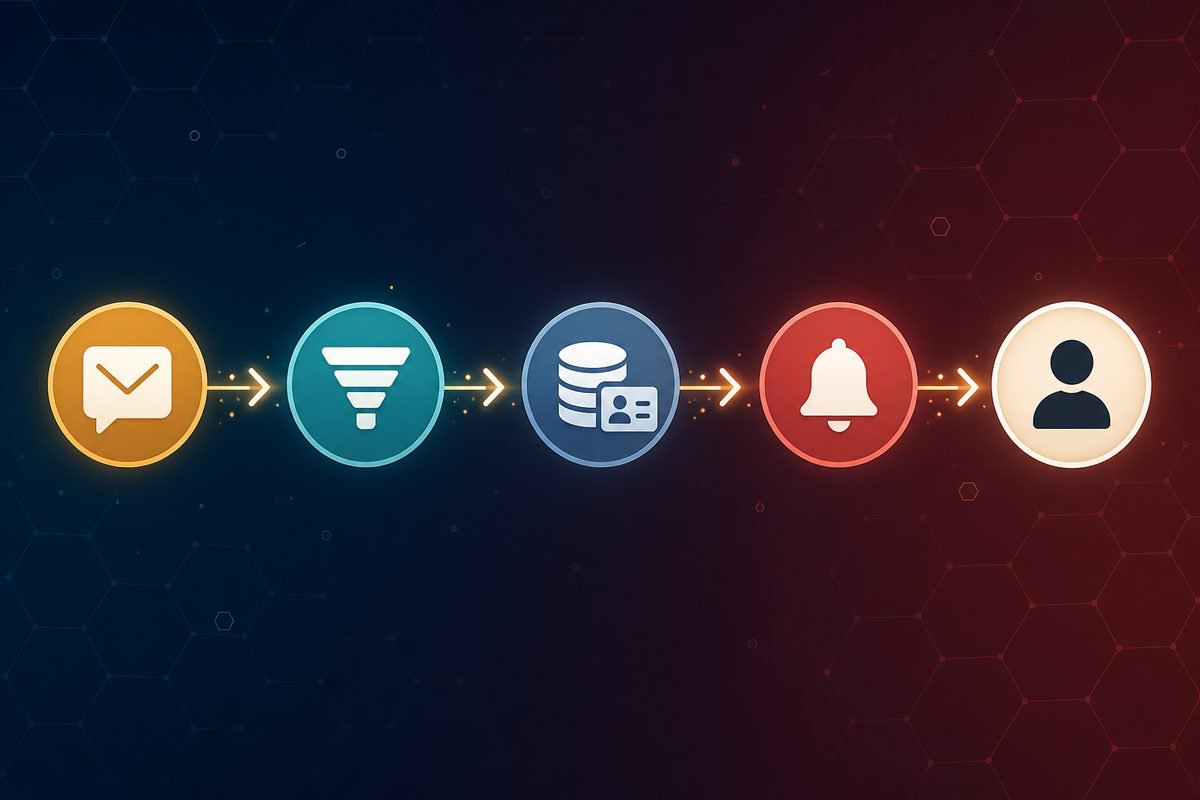
A simple workflow this enables:
That's a much more useful way to think about "AI for sales" than just "HubSpot has an AI writing assistant."
4. Best AI Tools for Customer Support
It's worth separating two things that get lumped together: an AI chatbot that answers questions on your website, and AI customer-support automation that actually resolves a ticket end-to-end, checks an order status, or escalates to a human when it should.
A basic chatbot is a good starting point. It handles FAQs and reduces the volume hitting your inbox. Full support automation goes further: it can look up a real order in your system, issue a refund within rules you've set, or update a customer record, not just answer a question from a script.
Intercom (Fin AI Agent)
What it does: AI agent that resolves customer support conversations, not just a scripted chatbot.
Best business use cases: Order status questions, returns/refunds within policy, account questions, first-line triage before a human gets involved.
Pros: Pay-per-resolution pricing means you're not paying for conversations it doesn't actually solve.
Limitations: Needs proper setup against your knowledge base and systems to be worth the cost; a poorly configured agent frustrates customers.
Who should use it: Businesses with enough support volume that a few hours a day are going to repetitive questions.
Pricing: Seat-based plans generally start in the $30 to $40/month range, with the AI agent itself billed per resolution.
5. Best AI Tools for Business Automation
This is the category that turns "AI tools" into "AI actually doing work for you." Three platforms dominate here, and they're built for different levels of complexity.
Zapier
What it does: Connects thousands of apps with simple trigger-and-action automations, now with an AI Copilot that can build a workflow from a plain-English description.
Best business use cases: Simple, single-path automations. New form submission → add to spreadsheet → send Slack message.
Pros: The largest app library, easiest to get started with no technical background.
Limitations: Gets expensive fast at higher automation volume; complex branching logic is awkward compared to Make.
Who should use it: Non-technical teams automating their first few workflows.
Pricing: Free tier for very light use; paid plans typically start around $20/month and scale with task volume.
Make
What it does: Visual, node-based automation builder with support for branching logic, routers and complex multi-step scenarios.
Best business use cases: Multi-step workflows that need conditional logic, like routing leads differently based on their source and value.
Pros: Noticeably cheaper than Zapier at comparable volume, more powerful branching logic.
Limitations: Steeper learning curve than Zapier.
Who should use it: Businesses that have outgrown simple one-step Zaps but don't need a developer on staff.
Pricing: Usable free tier; paid plans generally start around $10/month and scale with operations used.
n8n
What it does: Open-source automation platform with AI agent nodes, native support for connecting to large language models, and the option to write custom code for anything the pre-built nodes don't cover.
Best business use cases: High-volume automations, workflows that need custom logic, connecting AI models directly into a business process.
Pros: Can be self-hosted for a fraction of the cost of Zapier at scale, no hard ceiling on what it can be extended to do.
Limitations: Really needs someone comfortable with basic technical setup, whether in-house or a partner who builds it for you.
Who should use it: Businesses with real automation volume or workflows too specific for a template.
Pricing: Free if self-hosted (you pay only for the server it runs on); a managed cloud plan is also available.
What can you actually automate with these? A few real examples:
Lead automation
Invoice workflow
Customer support
This is a much more useful way to evaluate "automation" than a one-line summary like "Zapier is good for automation." The value is in the specific workflow it removes from someone's plate every day.
6. Best AI Tools for Productivity
Notion (with AI)
What it does: Combines documents, project tracking and a knowledge base in one workspace, with AI built in for summarizing and drafting.
Best business use cases: Turning meeting notes into action items, keeping project documentation up to date, building an internal knowledge base.
Pros: Flexible enough to replace several separate tools; the AI features work directly against your own content.
Limitations: Can turn into digital clutter without someone maintaining structure.
Who should use it: Small teams that need one shared home for documents and tasks.
Pricing: Free for individuals; team plans generally start around $10 to $15/month per seat.
Fireflies / Otter
What it does: Joins your calls, transcribes them, and summarizes the key points and action items automatically.
Best business use cases: Sales calls, client meetings, internal planning sessions, anywhere you'd otherwise be typing notes instead of listening.
Pros: A small team can turn an hour-long meeting into a clean summary with owners assigned, without someone spending 30 minutes writing it up afterward.
Limitations: Transcription accuracy drops with heavy accents, crosstalk, or poor audio.
Who should use it: Any business running regular client or team calls.
Pricing: Both have limited free tiers; paid plans typically run $8 to $20/month per seat.
7. Best AI Tools by Business Type
Different businesses lean on different combinations. A rough starting stack by type:
Agencies
ChatGPT or Claude for drafting, Canva for client creatives, HubSpot for pipeline tracking, Zapier or Make to connect client-reporting tools together.
Consultants
ChatGPT for proposals and research, a meeting transcription tool for client calls, Calendly for scheduling, a lightweight CRM to track engagements.
E-commerce
AI for product descriptions, an AI support agent for order questions, marketing automation for abandoned-cart and win-back emails, analytics for tracking what's actually converting.
Restaurants
AI for social content and review responses, WhatsApp or SMS automation for bookings and order updates, a scheduling tool for reservations.
Real estate
AI lead qualification for enquiries, AI-assisted property descriptions, a CRM with automated follow-up sequences.
Professional services
AI for proposal drafting and document analysis, Calendly for scheduling, a CRM for tracking engagements and renewals.
SaaS companies
AI customer support for tickets, AI-assisted documentation, developer tools, analytics, and sales automation for the pipeline.
8. You Don't Need 20 AI Tools
One of the easiest mistakes to make in 2026 is subscribing to every AI tool that shows up in your feed. Five different AI subscriptions don't automatically make a business more efficient. In a lot of cases they just mean five separate logins, five separate monthly charges, and none of them actually talking to each other.
In most cases, a small business gets real value from:
- 1 general AI assistant (ChatGPT or Claude)
- 1 design tool (Canva)
- 1 CRM (HubSpot)
- 1 automation platform (Zapier, Make or n8n)
The real value doesn't come from having more tools. It comes from connecting the tools you already have to how your business actually works day to day.
Smarteer's own content operations are a small example of this. Instead of stitching together a separate CMS, a separate AI writing tool and a separate image generator, our team runs everything through MaseOne, an AI-assisted CMS we built in-house that handles drafting, image generation and publishing in one place. One connected tool, not five disconnected subscriptions.
9. AI Tools vs AI Automation
These two get used interchangeably, but they're genuinely different things, and knowing the difference changes how you should think about your next purchase.
An AI tool
You open an application and ask it to do something. "Write a customer email." "Summarize this document." A person is still in the loop every time.
AI automation
The system does something automatically when an event happens, with no one needing to open an app or type a prompt. A new enquiry comes in, gets read and qualified by AI, updates the CRM, sends a response, and alerts a salesperson, all without a human triggering any of those steps.
AI tools help people work faster. AI automation helps a business work differently. Most businesses start with tools because they're easier to adopt, and grow into automation once they can see exactly which workflow is worth automating.
10. When Should You Build Custom AI Automation?
Off-the-shelf tools cover a lot of ground, but not everything.
Use an existing tool when:
- Your problem is generic and common across many businesses
- You don't need deep integrations with your own systems
- Some manual involvement is fine
- The current workflow already works well enough
Consider custom automation when:
- You repeat the same workflow every single day
- Multiple systems need to talk to each other
- Your process is genuinely specific to your business
- Employees are manually copying data between tools
- You need logic that's specific to how your business operates
- Existing tools don't integrate properly with what you already use
- You need AI working against your own data, not generic training data
A useful way to tell the difference: don't build "a custom AI chatbot because AI is cool." Build "an AI assistant that understands our internal documentation, qualifies leads automatically, creates CRM records, and escalates high-value enquiries to a person." One of those is a solution to a real problem. The other is a solution looking for a problem.
11. How Much Can AI Actually Save a Small Business?
Rather than taking a vendor's word for it, it helps to run the numbers yourself.
Say an employee spends 2 hours a day handling repetitive customer enquiries. That's roughly 40 hours a month. If automation reduces that workload by half, that's 20 hours a month freed up, worth pursuing whether you redeploy that time toward higher-value work or reduce overtime.
Monthly value created = hours saved × hourly cost of that time
ROI = (value created − the tool or automation's cost) ÷ the tool or automation's cost
Run this calculation for your own numbers before committing to any tool. If a $50/month tool saves 20 hours of a $15/hour employee's time, that's $300 of value against $50 of cost, a return worth having. If it only saves 2 hours, the math looks very different.
12. What AI Should NOT Do
Getting comfortable with AI in day-to-day work is good. Automating everything without limits isn't. A few things AI shouldn't be left to do on its own:
- Make important financial decisions without review
- Send sensitive customer or business information without a check
- Make legal decisions or commitments
- Approve every customer request automatically, regardless of value or risk
- Replace human review where a mistake would be genuinely costly
- Access sensitive systems without proper permission controls
Good automation has an escalation path built in: a point where the system hands off to a person instead of guessing. That single design choice does more for trust in your automation than any amount of AI sophistication.
13. A Starter AI Stack, by Stage
If you're deciding where to start, here's a rough progression that tends to work well:
Starter: ChatGPT + Canva + HubSpot (free tier) + Zapier or Make.
Growing business: ChatGPT or Claude + Canva + a paid CRM tier + automation platform + analytics.
More advanced: An AI assistant + CRM + n8n + an internal knowledge base + custom integrations between your existing systems.
Complex, business-specific workflows: Custom automation, built around exactly how your business operates rather than a generic template.
Frequently Asked Questions
What is the best AI tool for a small business just getting started?
Start with one general-purpose assistant like ChatGPT, and use it for writing, brainstorming and research. That single habit change tends to matter more early on than adding several specialized tools at once.
How much should a small business budget for AI tools?
A small team running one AI assistant, one design tool and one automation platform typically lands somewhere between $50 and $300 a month, depending on team size and how many seats you need. Costs scale up from there as you add a CRM or support automation.
Do I need a developer to use AI automation tools?
Not for Zapier or Make, both are built for non-technical users. n8n and any custom, business-specific automation generally do need either a technical hire or a partner who can build and maintain it for you.
What's the difference between an AI chatbot and AI automation?
A chatbot answers questions on a script or against a knowledge base. AI automation can take real actions, like looking up an order, updating a record, or triggering a workflow across multiple systems, not just answering a question.
When does it make sense to build custom AI automation instead of using an off-the-shelf tool?
When you're repeating the same multi-step workflow every day, when several systems need to talk to each other, or when your process is specific enough that no template quite fits it. At that point, a custom workflow usually pays for itself faster than another subscription.
Where Smarteer Fits In
Off-the-shelf AI tools are great when your process is fairly standard. But if your business runs on a workflow that spans multiple systems, needs business-specific rules, or just doesn't fit neatly into what a template offers, that's usually the point where a generic tool stops being enough.
Smarteer designs and builds AI automation around how your team actually works, not the other way around. If you're already using several AI tools but still doing the connecting work manually, that's often a sign you don't need another subscription. You need the tools you already have properly connected.
Explore Smarteer's AI & Automation Services →
About Smarteer
Smarteer is a technology consultancy that helps businesses build custom software, AI automation and digital products that fit how they actually operate. From web and mobile development to AI-powered workflow automation, we work with businesses that have outgrown generic tools and need something built around their own process.
Smarteer Team
Get a Free Technology Consultation
Talk to our experts about your project — no commitment required.
Book a Call →Build Your MVP in 4 Weeks
Proven framework. Fixed price. From zero to live product.
Learn More →Newsletter
Get the latest insights delivered to your inbox.