

15 Business Processes You Should Automate Before Hiring More Staff
Discover 15 business processes you should automate before hiring more staff - with specific tools, prioritization tips, and ROI guidance for teams of all sizes.
Mohan
Contents
The average small business owner spends 40% of their working hours on tasks that could be automated, yet most reach for a job posting before they reach for a workflow tool. Business process automation isn't just a cost-saving tactic; it's the difference between scaling a system and scaling a headcount problem. Before you commit to another salary, benefits package, and onboarding cycle, it's worth asking: is this a people problem, or a process problem?
In this guide, you'll learn exactly which 15 business processes are most commonly over-staffed, which automation tools handle each one effectively, and how to prioritize your rollout so you get ROI within weeks, not quarters. We'll also cover the common mistakes teams make when automating too fast or too slow, and where human judgment genuinely can't be replaced.
Whether you're a 5-person startup or a 200-person operation, the principle is the same: automate the repeatable, then hire for the irreplaceable.
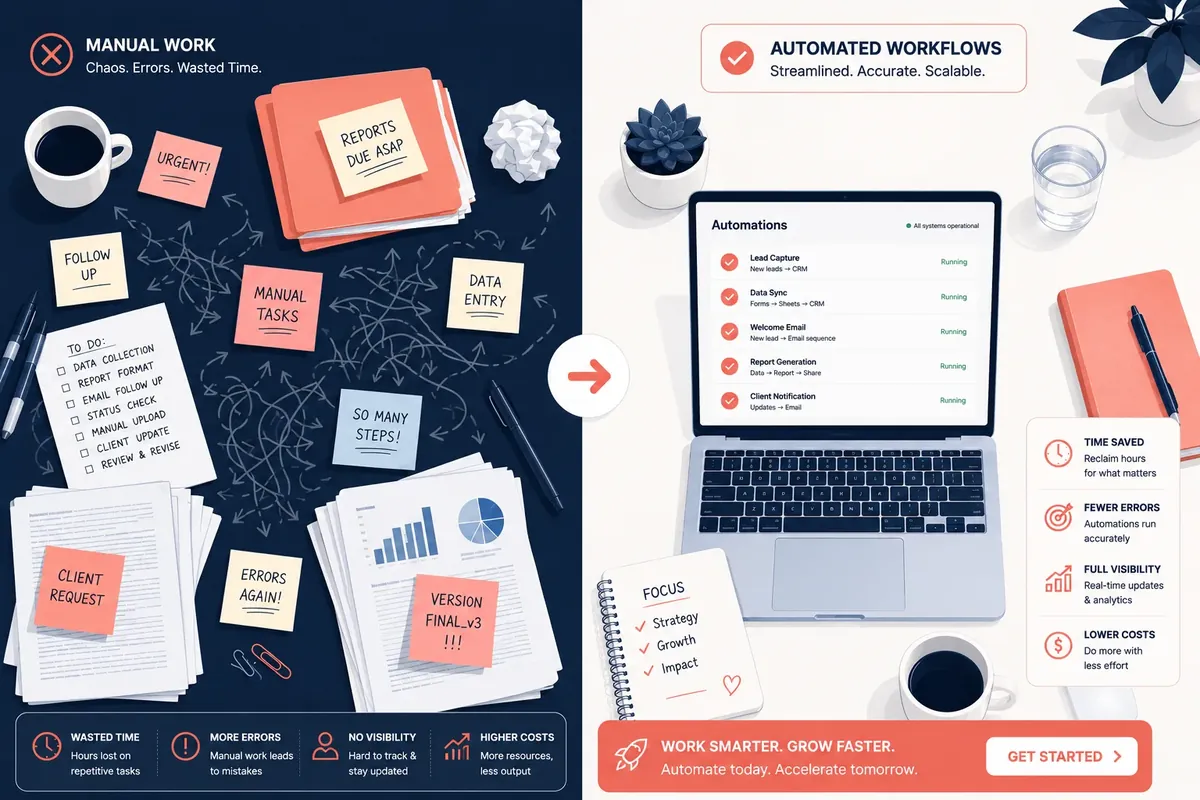
Why Automating Before Hiring Saves More Than Just Salary
Most hiring decisions are reactive. A bottleneck appears, a team member complains of overload, and the instinct is to add another body. But the true cost of a new hire: including recruiting, onboarding, training, and benefits, typically runs 1.25 to 1.4 times the base salary. For a $60,000 role, you're looking at $75,000–$85,000 in real cost in year one alone.
Automation tools, by contrast, often cost $50–$500 per month and run 24 hours a day without sick leave, performance reviews, or turnover risk. What we've seen work consistently is a simple audit: list every task your team complains about being repetitive, then ask whether a rule-based system could handle it 80% as well. If yes, automate first.
There's also a retention argument. High-performing employees leave when their days are filled with data entry, copy-paste tasks, and manual follow-ups. Automating the tedious work keeps your best people focused on high-judgment, high-satisfaction work, which directly impacts culture and retention.
The caveat worth naming: automation isn't free to implement. There's a setup cost in time and configuration, and poorly designed automations create their own chaos. The goal isn't to automate everything, it's to automate the right things before defaulting to hiring.
The 15 Business Processes You Should Automate First

1. Lead Capture and CRM Entry
Manually entering leads from web forms, ads, and emails into a CRM is a full-time task at scale, and a source of constant data errors. Tools like HubSpot, Zapier, or Make (formerly Integromat) can automatically create and enrich contact records from any source the moment a lead enters your funnel. In practice, this alone can free up 5–10 hours per week for a sales team of three.
2. Invoice Generation and Payment Follow-Up
Accounts receivable is one of the most over-staffed functions in small businesses. Platforms like QuickBooks, FreshBooks, or Stripe Billing can generate invoices on trigger, send payment reminders at set intervals, and reconcile payments automatically. A common mistake here is keeping a part-time bookkeeper for tasks that a $30/month tool handles more accurately.
3. Employee Onboarding Workflows
Each new hire typically requires 50–100 small tasks: account provisioning, document signing, training assignments, equipment requests. BambooHR, Rippling, or Notion-based workflows can trigger every one of these from a single "new hire" event, ensuring nothing falls through the cracks without a coordinator manually tracking each step.
4. Social Media Scheduling and Publishing
Creating content and publishing it are two different jobs. The latter is entirely automatable. Tools like Buffer, Later, or Hootsuite allow teams to batch-create content once a week and automate publishing across every channel at optimal times. the analytics side, these same tools report on performance automatically, eliminating manual reporting cycles.
5. Customer Support Ticket Routing
Not every support ticket needs a human reading it before it's assigned. Automation rules in Zendesk, Freshdesk, or Intercom can classify, tag, and route tickets based on keywords, customer tier, or issue type, ensuring urgent issues reach the right agent immediately without a triage coordinator in the middle.
6. Appointment Scheduling and Reminders
Calendly, Acuity Scheduling, or Microsoft Bookings eliminate the back-and-forth email chains that consume hours every week. Automated confirmation emails, reminder sequences, and post-meeting follow-ups can all run without human involvement. For service businesses, this is often the single fastest win.
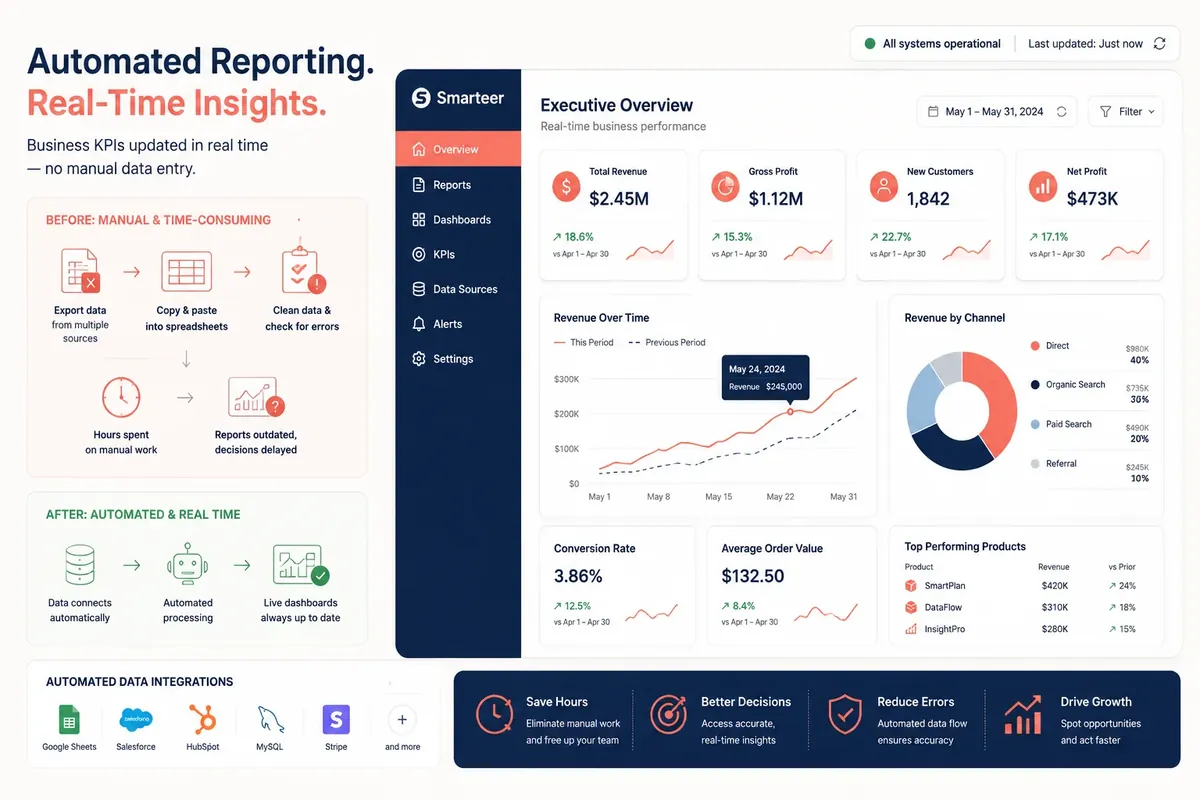
7. Report Generation and Data Aggregation
If someone on your team spends time pulling numbers from different platforms and pasting them into a spreadsheet or slide deck, that process is entirely automatable. Google Looker Studio, Databox, or Power BI can pull from multiple data sources and generate live dashboards or scheduled PDF reports without a human touching a formula.
8. E-commerce Order Processing and Fulfillment Notifications
For product businesses, the entire order-to-fulfillment communication chain, order confirmation, shipping notification, tracking updates, delivery confirmation, can be fully automated through platforms like Shopify, ShipStation, or WooCommerce. Adding a human to this loop adds latency and error, not value.
9. Email Marketing Sequences
Welcome sequences, re-engagement campaigns, post-purchase flows, these are logic trees, not creative decisions that require daily attention. Klaviyo, Mailchimp, or ActiveCampaign let you build sophisticated, behavior-triggered email sequences once and run them indefinitely. The nuance: someone still needs to write the emails and audit performance quarterly. Automate the send; keep the strategy human.
10. Contract Generation and e-Signature Workflows
Sales teams that manually edit contract templates for every deal are burning time on work that DocuSign, PandaDoc, or Ironclad handle natively. Template-based contract generation with dynamic fields, automatic routing for signatures, and completion notifications can compress a two-day process into two hours.
11. IT Helpdesk and Access Provisioning
Password resets, software access requests, and hardware tickets follow predictable patterns. Systems like Okta, JumpCloud, or ServiceNow can automate provisioning and deprovisioning based on HR system triggers, meaning when someone joins or leaves, their access is adjusted automatically without a ticket to IT.
12. Inventory Monitoring and Reorder Alerts
For product-based businesses, manually checking stock levels and placing reorders is a high-frequency, low-judgment task. TradeGecko (now QuickBooks Commerce), Cin7, or even Shopify's built-in alerts can trigger reorder requests when inventory drops below a threshold, complete with pre-filled purchase orders.
13. Customer Feedback Collection and Tagging
Sending NPS surveys, collecting responses, and tagging feedback by theme is exactly the kind of structured, repeatable work that automation handles well. Delighted, Typeform + Zapier, or Hotjar can automate the entire collection and categorization pipeline, sending weekly digests to leadership without any manual curation.
14. Payroll Processing
Modern payroll platforms like Gusto, ADP Run, or Rippling have made manual payroll runs largely obsolete for businesses under 200 employees. Tax calculations, direct deposits, year-end filings, and compliance updates are handled automatically. In practice, most small businesses that still run payroll manually do so out of habit, not necessity.
15. Content Workflow Approvals and Publishing
Editorial calendars, draft submissions, review cycles, and publishing, these can all be managed through tools like Notion, Airtable, or Monday.com with automated status transitions, reviewer notifications, and scheduled publishing. What we've seen work is tying these directly to your CMS so approved content publishes without a manual step.
Learn how to build an automated content publishing workflow from scratch
How to Prioritize Which Processes to Automate First
Not every automation delivers equal ROI. Before you start spinning up Zapier workflows, run a quick triage. The most valuable automations share three traits: they're high-frequency (done daily or weekly), rule-based (the same inputs reliably produce the same outputs), and currently handled by expensive time (either a senior person's time, or tasks causing downstream delays).
Audit your team's weekly tasks: ask everyone to log every recurring task for one week, noting time spent and whether a clear rule governs the output.
Score by frequency × cost × replaceability, a task done daily by a $40/hr employee that a $20/month tool can handle is your highest-priority automation.
Start with one workflow, run it for 30 days: don't automate 15 processes at once. Build confidence and catch edge cases before expanding.
Document the exceptions: every automated process has edge cases that require human judgment. Define those upfront so your team knows when to intervene.
Measure time saved at 30, 60, and 90 days: compare against the automation tool cost to validate ROI before expanding.
See our process audit template for identifying your top automation opportunities
Common Mistakes Teams Make When Automating Business Processes
Automation done poorly creates a different set of problems, siloed data, broken workflows, and frustrated customers getting the wrong automated response at the wrong moment. The most common mistake we see is automating a broken process. If the underlying logic is flawed, the automation just executes flawed logic faster and at scale.
Automating without documentation: if the logic lives only in your head, the automation will break when edge cases arise and no one will know how to fix it.
Over-automating customer interactions: chatbots and automated responses are valuable for tier-1 queries, but customers escalate fast when they can't reach a human. Always build an escalation path.
Ignoring tool integration limits, not every platform plays nicely with every other. Test integrations under real load before decommissioning the manual process.
Failing to audit automations quarterly: business rules change. An automation built 18 months ago may be sending the wrong message, applying the wrong discount, or routing to a team that no longer exists.
Treating automation as a replacement for process design: automation is an accelerator for good process, not a fix for bad process. Redesign first, automate second.
Read our guide to designing clean business processes before automating them
When You Actually Do Need to Hire
Automation has real limits. It handles the predictable; humans handle the novel. Creative judgment, relationship management, strategic decisions, and complex problem-solving don't reduce to rules, and attempting to automate them usually produces customer-alienating, brand-damaging results.
The hiring threshold we recommend: once you've automated every repeatable process in a function, look at what's left. If the remaining work is high-judgment, high-relationship, or genuinely creative, and if the volume of that work is growing, then you have a real hiring case. You're adding a human for human work, not for work a system should be doing.
Results will vary significantly based on your industry, tech stack, and team maturity. A SaaS company can automate 70% of its ops work; a law firm might automate 30%. The right number isn't universal, the right question is always "what's left after we've automated everything we responsibly can?"
What This Means for Indian Small Businesses
India has over 63 million MSMEs, and the vast majority run on founder energy and family labour. That's the first thing that makes automation feel unnecessary - when your cousin handles billing and your brother-in-law does follow-ups, it doesn't feel like a staffing cost. But it is. You're burning family goodwill and productive hours on tasks that a Rs. 2,000/month tool can handle better and faster.
GST alone has created a compliance burden that didn't exist a decade ago. If you're filing GSTR-1 and GSTR-3B manually every month, you're spending hours that should go toward customers or product. Tools like Zoho Books or Tally Prime connect directly to the GSTN portal, auto-populate return data, and flag mismatches before they become notices. Both qualify for input tax credit as a business software expense under GST - so the effective cost drops further.
WhatsApp Business is already the most underused automation asset in Indian SMBs. Most businesses use it to chat. But with the API or tools like Interakt or Wati, you can automate order confirmations, payment reminders, and festive season offers to your entire customer list without hiring a single extra person for outreach. Pair that with Razorpay or Instamojo for automated payment collection and reconciliation, and you've eliminated at least two recurring manual workflows.
Tier-2 and tier-3 city businesses often assume automation is expensive or requires technical staff. It doesn't. UPI adoption has already crossed 14 billion monthly transactions - your customers are digital even if your back office isn't. The tools exist, they're priced for Indian budgets, and most offer free trials.
Start with whichever process costs you the most time this month - GST filing, payment follow-ups, or inventory updates - and automate that one thing before you consider posting a job.
Frequently Asked Questions
What are the most important business processes to automate first?
Start with high-frequency, rule-based tasks that consume significant staff time: lead capture, invoice follow-up, appointment scheduling, and report generation typically deliver the fastest ROI. Prioritize processes where errors are common and the logic is consistent, these are the clearest wins for automation before hiring.
How much does it cost to automate business processes for a small business?
Most small businesses can automate core workflows for $100–$500 per month using tools like Zapier, HubSpot, Gusto, and Calendly. The real cost is setup time, typically 5–20 hours per workflow depending on complexity. Compare this against the $75,000+ annual cost of a new hire, and the ROI case is usually clear within the first month.
Can business process automation replace employees?
Automation replaces repetitive, rule-based tasks, not employees. In practice, it shifts what employees spend their time on, moving them from low-judgment data entry and manual coordination toward higher-value, creative, and relational work. Teams that automate well typically don't shrink; they grow more strategically and retain staff longer.
What tools are best for automating business processes without coding?
Zapier and Make (formerly Integromat) are the most widely used no-code automation platforms, connecting thousands of business apps without requiring engineering resources. For more complex workflows, tools like Notion, Airtable, and Monday.com offer built-in automation with visual workflow builders that non-technical teams can manage independently.
How do I know if a business process is ready to automate?
A process is ready to automate when it meets three criteria: it happens repeatedly on a predictable schedule or trigger, the same inputs reliably produce the same correct outputs, and the cost of errors is low enough to accept an occasional edge case. If a process requires significant judgment or varies widely each time, redesign it before automating.
What is the biggest risk of automating business processes too quickly?
The biggest risk is automating a broken or undocumented process, which scales the problem rather than solving it. Other common risks include over-automating customer interactions (alienating customers who need human help), creating data silos when tools don't integrate properly, and building automations that no one on the team knows how to maintain or troubleshoot.
Conclusion: Automate the System Before You Scale the Team
The three most important takeaways from this guide: first, business process automation delivers faster ROI than hiring for any repeatable, rule-based task, often paying for itself in the first 30 days. Second, prioritization matters more than speed, automate the highest-frequency, highest-cost processes first, and build confidence in each workflow before expanding. Third, automation isn't a replacement for good process design, fix the logic before you automate it, or you'll scale your problems alongside your efficiency.
The companies that scale without chaos aren't the ones with the most headcount, they're the ones with the best-designed systems. Business process automation is how you build those systems before payroll forces the issue.
Your next step: pull up your team's task list for the past week, identify the three most time-consuming repeatable tasks, and research one automation tool for each. You don't need to automate everything at once, you just need to start before your next hire.
Mohan
CEO of Smarteer
Get a Free Technology Consultation
Talk to our experts about your project — no commitment required.
Book a Call →Build Your MVP in 4 Weeks
Proven framework. Fixed price. From zero to live product.
Learn More →Newsletter
Get the latest insights delivered to your inbox.