

LinkedIn Content Strategy: Write a Full Week of Posts in 2 Hours Flat
Master a proven LinkedIn content strategy and write a full week of posts in 2 hours. Step-by-step batching system used by top LinkedIn creators to stay consistent without burnout.
Smarteer Team
Contents
Most professionals spend more time thinking about LinkedIn than actually posting on it. A solid LinkedIn content strategy shouldn't consume your week. Yet the average person burns 45 minutes crafting a single post, second-guessing every word, and then abandoning the draft entirely. That's a broken system, not a content problem.
Here's what's actually possible: with the right batching process, a clear LinkedIn posting schedule, and a few repeatable frameworks, you can produce five to seven high-quality posts in a single two-hour session. No burnout, no blank-page paralysis, no recycling the same "excited to announce" template everyone ignores.
In this guide, you'll learn how to audit your content pillars, batch-write using proven post structures, use free and paid tools to speed up production, and schedule everything so your profile stays active without requiring daily attention. This approach works whether you're a solopreneur, a B2B sales professional, or a founder building a personal brand.
Let's get into the actual process.

Why Batching Is the Core of Any Efficient LinkedIn Posting Schedule
Context-switching is the enemy of content creation. When you try to write one post per day, you spend the first 10 minutes just re-entering the creative headspace. Multiply that by five days and you've lost nearly an hour before writing a single sentence. Batching eliminates that tax entirely.
The science backs this up. Research from the University of California, Irvine found that it takes an average of 23 minutes to fully regain focus after an interruption. Content creation is cognitively demanding, and fragmenting it across the week guarantees you're never operating at full capacity.
In practice, batching works because it lets you stay in one mental mode for an extended period. You brainstorm during brainstorm time, write during writing time, and edit during editing time. These are genuinely different cognitive states, and forcing your brain to toggle between them mid-session is where quality drops.
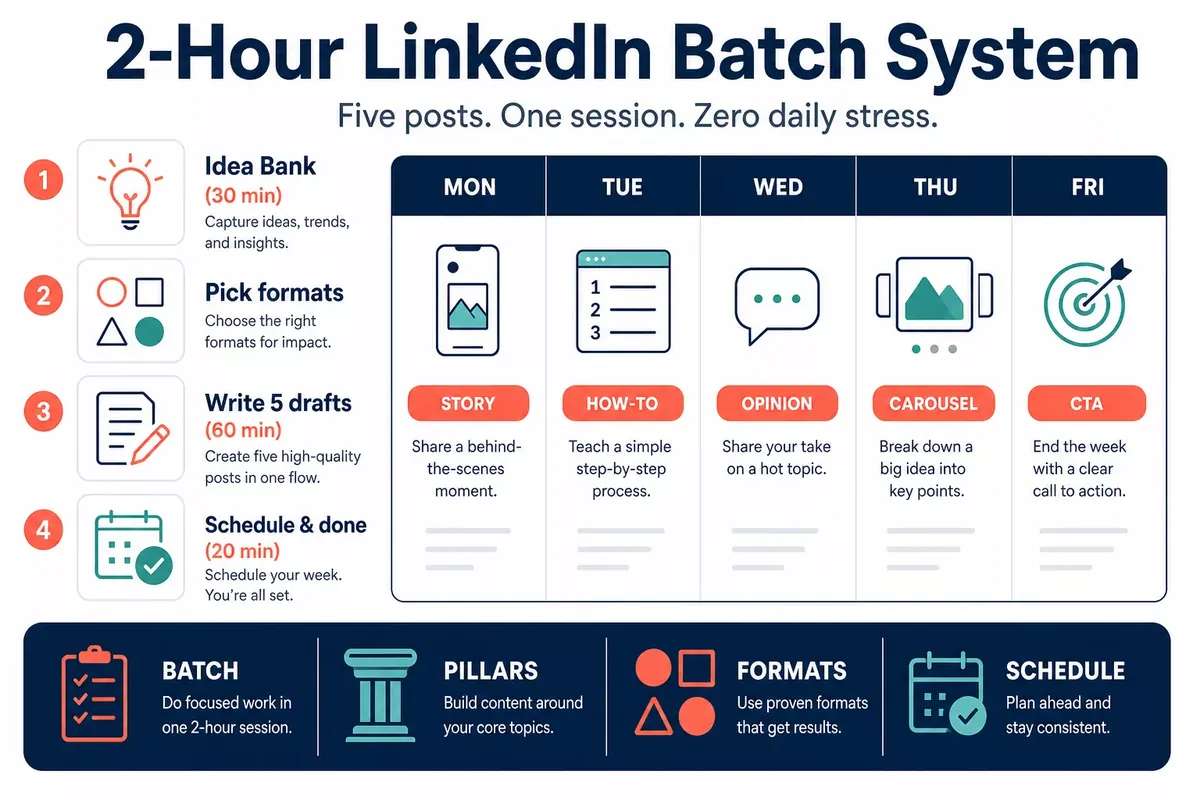
A well-designed LinkedIn posting schedule built around batching typically looks like this: one 90-minute content session per week, one 20-minute scheduling session, and then you're done. The posts go out automatically while you focus on actual work. Most teams overlook how much mental bandwidth gets reclaimed once this system is in place.
One caveat worth acknowledging: batching requires a content library of ideas to draw from. If you sit down with no material and try to generate everything from scratch in two hours, you'll struggle. The prep work is where the real efficiency lives.
Building Your Content Pillar Map Before You Write a Single Word
A content pillar is a broad topic area you return to consistently. It's the strategic backbone of your LinkedIn content strategy. Without pillars, you're just reacting to what feels interesting that day, which produces inconsistent, unfocused content that doesn't build an audience.
Most professionals do well with three to four pillars. More than that and your profile starts to feel unfocused. Fewer than three and your content gets repetitive fast.
How to Choose Your Pillars
Start by asking three questions:
- What do you want to be known for professionally in 12 months?
- What problems do your ideal readers or clients face that you genuinely understand?
- What do you have opinions about that most people in your field won't say out loud?
A sales leader's pillars might be: pipeline management, sales team culture, buyer psychology, and personal career development. A UX designer might anchor around: product thinking, design critique, career transitions, and accessibility advocacy.
Write your pillars down before your batching session. They act as guardrails during brainstorming so you don't spend 30 minutes debating what to write about.
The Rotating Pillar System
Each week, assign one pillar per post slot. With five posts, you cover four pillars with one slot for a timely or reactive piece. This rotation prevents over-indexing on one topic and keeps your feed varied enough that different segments of your audience stay engaged.
Learn how to build a complete social media content calendar that ties your pillars to business goalsThe 30-Minute Idea Bank That Powers Your Entire Session
Thirty minutes of structured brainstorming at the start of your session is worth more than two hours of staring at a blank screen. The goal here isn't to write posts. It's to generate raw material, fragments, angles, and observations that you'll shape into posts in the next phase.
Here are six prompts that reliably surface strong LinkedIn post ideas:
- What did you learn this week that surprised you? Counterintuitive insights perform exceptionally well on LinkedIn because they challenge assumptions.
- What mistake did you make or observe? Vulnerability posts consistently outperform pure advice posts in engagement, as long as there's a lesson attached.
- What question did a client, colleague, or stranger ask you? If one person asked it, hundreds more have the same question.
- What conventional wisdom in your industry is simply wrong? Contrarian takes drive comments.
- What's a process or system you've refined over time? Step-by-step posts are high-value and easy to write once you document what you already do.
- What result did you achieve (or help someone achieve) recently? Case studies and mini success stories build credibility.
Set a 25-minute timer. Use a tool like Notion, Obsidian, or even a Google Doc to capture every idea without judging it. Aim for 15 to 20 raw ideas. You'll only use five to seven, but volume removes the pressure to make every idea perfect.
Post Formats That Write Themselves (and Why Format Choice Matters)
Format is your structural scaffold. When you know the format before you start writing, you're filling in a template rather than inventing from scratch. That's a 40 to 60 percent reduction in writing time, conservatively.
These five formats cover roughly 90 percent of high-performing LinkedIn posts:
The List Post
Hook line, then five to ten numbered or bulleted items, each with a brief explanation. Scannable, shareable, and easy to produce. Best for tactical advice and frameworks. Example: "5 things I stopped doing on LinkedIn that doubled my reach."
The Story Post
Open with a specific scene or moment, build tension through a challenge, resolve with a lesson. Three to five short paragraphs. This format humanizes you more than any other. A common mistake here is making the story too long. Keep it under 200 words and make sure the lesson is clear.
The Hot Take
State a position, explain your reasoning, acknowledge the counterargument, reaffirm your stance. This format generates comments because it invites disagreement. It works best when your take is genuinely argued, not just provocative for its own sake.
The Case Study Mini-Post
Context (who, what situation), action (what was done), result (specific outcome), lesson (what others can take from it). Even a two-paragraph version of this format performs well because specificity builds trust.
The Question Post
Ask your audience something specific and relevant to their work. These drive comment volume, which signals to LinkedIn's algorithm that the post is worth distributing. The question needs to be specific enough that people feel qualified to answer it.
Pick your five post ideas from the brainstorm phase and match each to a format before you start writing. That decision alone saves 10 to 15 minutes per post.
See how top LinkedIn creators structure their content calendars to maintain consistency at scaleThe Writing Phase: How to Draft Five Posts in 60 Minutes
With your ideas and formats in hand, this phase is about speed over perfection. You're drafting, not publishing. The goal is to get all five posts into rough-draft form before you edit any of them. Editing while writing is the number-one speed killer in content creation.
Set a 12-minute timer per post. When it goes off, move on. You can clean up later. Most people find that their 12-minute draft is only marginally worse than what they'd produce in 45 minutes because the extra time goes to overthinking, not improvement.
Start every post with your hook. On LinkedIn, the first one to two lines are visible before the "see more" cut-off. If those lines don't create curiosity or promise value, most people scroll past. Write the hook last if you find it easier, but make it your editing priority.
A few technical notes that affect performance:
- Keep paragraphs to one or two sentences. LinkedIn's mobile feed makes long paragraphs visually punishing.
- Avoid links in the post body. LinkedIn's algorithm suppresses posts with outbound links. Put the link in the first comment instead.
- End with a question or a clear invitation to engage, not a passive "hope this helps."
- Aim for 150 to 300 words for most post types. Long-form posts (over 600 words) can work, but they require a stronger narrative to hold attention.
We've found that professionals who write all five drafts before editing them produce significantly better content than those who polish as they go. The drafting brain and the editing brain work differently. Trust the process.
Tools That Accelerate Your Social Media Efficiency Without Replacing Your Voice
There's a real risk of over-automating LinkedIn content. If every post sounds like it came from a template generator, your audience will notice and disengage. The tools below are meant to reduce friction, not outsource your thinking.
Scheduling tools: Buffer, Hootsuite, and LinkedIn's own native scheduler all work. For teams, Publer or Metricool offer stronger collaborative features. Schedule your posts at least 24 hours in advance so you can do a final read with fresh eyes before anything goes live.
Idea capture: Notion, Obsidian, or even Apple Notes. The tool matters less than the habit. Keep a running "swipe file" of posts you've seen on LinkedIn that resonated with you. Not to copy them, but to understand what formats and angles land in your industry.
AI writing assistance: Tools like Claude or ChatGPT can help you overcome blank-page paralysis or generate alternate hooks for a draft you're stuck on. The key is to treat AI output as raw material, not finished copy. Your edits are what make it sound like you.
Analytics: LinkedIn's native analytics show you impressions, clicks, and engagement by post. Check these monthly, not daily. Daily analytics create anxiety; monthly reviews reveal actual patterns about what content resonates with your specific audience.
What we've seen work is using tools for scheduling and idea organization, and keeping the actual writing process human. That balance is what maintains authenticity at scale.
Compare the top social media scheduling tools for professionals managing LinkedIn, Instagram, and Twitter simultaneouslyScheduling and Publishing: Turning Drafts Into a Working LinkedIn Posting Schedule
Once your five drafts are written and lightly edited, the scheduling phase should take no more than 20 minutes. Open your scheduling tool of choice, paste each post, assign a publishing day and time, and add a reminder to post the link in the first comment after it goes live.
On timing: LinkedIn engagement tends to peak Tuesday through Thursday, between 8 and 10 a.m. and again around noon in your audience's primary timezone. That said, your own analytics will eventually show you your specific audience's behavior patterns, which may differ from general benchmarks.
A five-post weekly cadence is strong but not mandatory. Many professionals maintain meaningful LinkedIn presences with three posts per week. Consistency matters more than volume. A LinkedIn posting schedule you can sustain for 12 months beats an aggressive cadence you abandon after six weeks.
Block your batching session on your calendar the same day and time each week. Treat it like a client meeting you can't reschedule. The two-hour investment becomes habitual quickly, and the compounding effect on your LinkedIn presence is significant over a quarter.
What This Means for Indian Small Businesses
India has over 63 million MSMEs, and almost none of them are using LinkedIn the way they should. Most Indian small business owners are active on WhatsApp Business and IndiaMART, which makes sense for day-to-day sales. But LinkedIn is where your B2B buyers, potential partners, and corporate clients are spending time - and if you're not showing up there consistently, you're invisible to them.
The batching approach described above is especially practical for Indian business owners because you're already juggling a lot. GST filing deadlines, festive season inventory (Diwali, Navratri, year-end), and the daily grind of running a family business don't leave much room for content creation. Sitting down for two hours on a Sunday to draft an entire week of posts fits the Indian work rhythm far better than trying to post something every morning.
Cost is another real factor. Tools like Buffer or Hootsuite are priced in dollars, which adds up fast at current exchange rates. Zoho Social is a strong Indian alternative - it's priced in INR, GST-compliant invoicing is built in, and it integrates cleanly with Zoho CRM if you're already in that ecosystem. For most Indian SMBs budgeting around Rs. 1,500 to Rs. 3,000 per month on marketing tools, Zoho Social hits the right price point without the dollar conversion headache.
One more thing: don't just post about your products. Indian audiences on LinkedIn respond well to founder stories, behind-the-scenes content from family businesses, and honest takes on navigating GST or compliance challenges. That kind of content builds trust faster than any promotional post will.
Start with one batch session this weekend. Pick three content themes relevant to your industry, draft five posts in one sitting, and schedule them across the week using Zoho Social or even the free LinkedIn scheduler built into the platform itself.
Frequently Asked Questions
How many times a week should I post on LinkedIn?
Three to five times per week is the range most consistently associated with audience growth on LinkedIn. Fewer than three posts weekly and you're competing against the algorithm's tendency to de-prioritize inactive profiles. More than five and you risk content fatigue with your network. Start with three if you're new to a batching workflow and increase once the system feels sustainable.
What is the best time to post on LinkedIn for maximum reach?
Tuesday through Thursday between 8 and 10 a.m. tends to outperform other windows based on aggregate platform data. However, your audience may behave differently. Check LinkedIn's native analytics after 90 days of consistent posting to identify when your specific followers are most active, and adjust your schedule accordingly.
Can I use AI to write my LinkedIn posts?
AI tools can help you break through writer's block, generate hook variations, or restructure a draft that isn't landing. But publishing AI-generated content without meaningful editing produces posts that feel generic and damage your credibility over time. The most effective approach is to use AI as a brainstorming partner and editing assistant, not as the author.
How long should a LinkedIn post be?
150 to 300 words covers most post types effectively. LinkedIn truncates posts after approximately 210 characters, so the first two lines need to earn the "see more" click. Long-form posts over 600 words can perform well, particularly for thought leadership pieces, but they require a compelling narrative structure to retain readers. Shorter is generally safer until you know your audience's preferences.
What should I post on LinkedIn if I don't have anything to say?
This usually means your content pillar map isn't defined yet. When you have clear topics anchored to your expertise and your audience's pain points, there's always something to write about. Pull from your week's actual experiences: a client question, a decision you made, something you read that challenged your thinking, or a process you refined. Your daily work is a content library you're not mining yet.
Is it better to post native content on LinkedIn or share articles?
Native text posts and native video consistently outperform shared links in LinkedIn's algorithm because the platform wants users to stay on LinkedIn rather than click away. If you want to share an article, write a substantive native post about your key takeaway and put the link in the first comment, not the post body. This approach preserves your reach while still directing interested readers to the source.
Putting It All Together
The core insight behind this entire approach is that content creation bottlenecks are almost always process problems, not creativity problems. The professionals who maintain a consistent LinkedIn content strategy over years aren't more talented than everyone else. They've built a repeatable system that removes friction at every stage.
The three things that matter most: build a content pillar map so you always know what you're writing about, batch your drafts in a single session instead of writing daily, and use a scheduled publishing tool so distribution requires no daily effort. Those three habits compound over time.
Your specific results will vary based on your industry, your existing network size, and how closely your content matches what your audience actually cares about. Expect the first four to six weeks to feel slow. Consistency through that period is what separates professionals who build meaningful LinkedIn audiences from those who give up and conclude that "LinkedIn doesn't work."
Start this Sunday. Block two hours, pull out your content pillars, set a timer for brainstorming, and draft your first batch of five posts. Schedule them before you close your laptop. That single session will do more for your LinkedIn presence than six months of daily good intentions.
Wondering where LinkedIn and content creation fit into your overall marketing spend? See our digital marketing budget guide for Indian small businesses for a stage-by-stage breakdown.
Smarteer Team
Get a Free Technology Consultation
Talk to our experts about your project — no commitment required.
Book a Call →Build Your MVP in 4 Weeks
Proven framework. Fixed price. From zero to live product.
Learn More →Newsletter
Get the latest insights delivered to your inbox.